Professional
Motorola Service
Software
Device management, network configuration, bootloader maintenance, firmware servicing, full diagnostics — everything in one lightweight Windows tool. Trusted by authorized technicians worldwide.
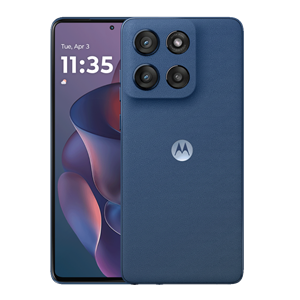
Complete Motorola Service Suite
Six professional tools in one application — everything an authorized technician needs.
Device Authentication
Professional device management and account recovery for all Motorola Moto devices. Restore device access quickly, safely, and without data loss on supported chipsets. Designed for authorized service centers.
Bootloader Management
Configure the bootloader for advanced development, system recovery, and authorized device maintenance on your Motorola device.
Network Configuration
Configure network settings and carrier profiles so your Moto phone works seamlessly on any compatible network worldwide. Ideal for traveling or switching providers.
Firmware Servicing
Install stock firmware updates, restore non-booting devices, and manage software versions safely.
IMEI Diagnostics
Read, verify, and manage device identity information on supported Motorola models using manufacturer-standard diagnostic methods.
Device Diagnostics
Read full device information, check service eligibility, verify firmware version, run hardware diagnostics, and generate detailed reports — all before you begin any service operation. Essential for professional repair workflows.
Transparent Credit Pricing
No subscriptions, no hidden fees. Pay only for the services you use.
Motorola FRP
- All Motorola Models
- Instant Processing
- No Data Loss
Motorola Network/Carrier Unlock
- All Networks Supported
- Permanent Solution
- Worldwide Use
Motorola Repair CPID
- Full Diagnostics
- Safe & Reversible
- All Chipsets
Motorola Unlock Bootloader
- Full Device Access
- Developer Mode
- System Recovery
Up and Running in Minutes
Four simple steps from sign-up to servicing your first device.
Create Your Account
Register for free in under 30 seconds. No credit card required to get started.
Purchase Credits
Buy credits from any of our authorized resellers around the world. Instant top-up.
Download & Install
Download the lightweight Windows tool, install it, and log in with your account.
Start Servicing
Connect the Motorola device via USB, choose a service, and hit go. Done in minutes.
Built for Professionals
What sets Moto Service Tool apart from the rest.
Lightning Fast
Most operations complete in under 60 seconds. No waiting, no delays — connect and go.
100% Safe
All operations are tested and verified. All methods are manufacturer-approved where applicable. Your device stays protected.
Regular Updates
New models, chipsets, and security patches added every week to keep you ahead.
Pay Per Use
No subscriptions. Buy credits only when you need them. Credits never expire.
Active Community
Join our Telegram group with thousands of technicians sharing tips and support.
24/7 Support
Dedicated support team ready to help anytime via Telegram, email, or WhatsApp.
150+ Motorola Models Supported
Check if your device is on the list. New models are added with every update.
Moto G Series
Moto Edge
Moto Razr
Moto E Series
Other Models
What Our Users Say
Trusted by technicians and repair shops around the globe.
"Best Motorola service tool I've used. Device management works perfectly on all the G series phones we handle in our repair center. Fast and reliable."
"The carrier configuration feature saved my business. Customers used to wait days — now it's instant. 10/10 would recommend."
"Excellent tool with great support. The credit system is fair — pay per use, no subscriptions. Support team replies within minutes."
Authorized Resellers
Purchase credits from our verified partners. Available worldwide.


UnlockTrue
Bangladesh /Middle East /Algeria /Brazil/ Morocco /WorldWide
Gsm ninja
Worldwide

Common Questions
A professional Windows desktop application for Motorola device management. It supports device servicing, bootloader maintenance, carrier configuration, firmware management, device diagnostics, and detailed info reading — all in one tool. Built for authorized repair centers.
We offer device management, bootloader maintenance, carrier configuration, stock firmware servicing, device diagnostics, and info reading. Each service uses a separate credit amount.
Yes. Our firmware feature uses verified Motorola stock firmware. It can restore non-booting devices, update to the latest software, or adjust firmware versions safely.
Purchase credits from our authorized resellers. Visit the Resellers section to find a trusted seller in your region. Credits are added to your account instantly.
We support 150+ models including Moto G, E, Edge, Razr, ThinkPhone, and more. New models are added with every software update — check our supported devices section above.
Moto Service Tool runs on Windows 7, 8, 10, and 11 (64-bit). You will also need a USB cable to connect your Motorola device.
No. Your credits never expire. Use them whenever you need to — there's no time limit or monthly usage requirements.
Credits are only deducted when the server returns a successful result. If something goes wrong, your balance remains unchanged. Contact support for any issues.
Ready to Service Your First Device?
Download the tool, create your account, and start managing Motorola devices today. Join thousands of authorized technicians already using Moto Service Tool.